Showing posts with label woods. Show all posts

Monday, 4 November 2019

How to capture Autumn colours

Capture the Autumn Colours

Autumn is one of my favourite seasons for photography as it’s filled with cool nights, misty mornings, golden lighting, dew drops on spider webs, reflections of autumn colours in the water, long shadows and fallen leaves which all create a great atmosphere. But most importantly, the striking colours in the environment.

The main advantage of living around trees, parks and woodland areas, is that you don’t have to travel far to capture the autumn colours. Most of the woodland locations are easily accessed by public footpaths. Local parks provide plenty of opportunities for close-up nature photography.

The colours at the beginning of autumn can be disappointing, it is advisable to wait till they are rich and vibrant, which is usually at the end of October till end of November. However, keep an eye on your surroundings and keep your gear and equipment ready to capture the best lighting.

Here are a few tips to keep in mind when taking autumn photographs:

Camera settings:

SLR: To photograph Landscapes, set the camera on Aperture Mode at f11 or f16, the camera will adjust the shutter speed accordingly. For Close-up Nature photography, use an aperture of f4 or f5.6. The use of a tripod is recommended as exposures will be long.

Compact Camera: Set the camera on Landscape Mode. For close-ups use mode. These modes are also available on SLRs.

I took the below photograph using my compact camera. The photograph has been changed to sepia using an editing software. Many compact cameras have an inbuilt facility which allows you to change the tone of your image. (This can be found in the menu settings of your camera). I always take two photographs of the same scene, one in colour and other in b/w or sepia. 


Framing:

Trees make dominant focal points and create the finest displays, use ‘rule of third’ to frame the scene.


Catch the light:

The warm light at early morning or evening is perfect to capture some stunning autumn photographs, so get up early to photograph the ‘Golden Light’.

The Golden bench
Bridge on River Thames
Move closer to concentrate on detail:

Instead of just photographing wider landscapes, create a much stronger composition by moving closer to the subject. Focus all the attention on a single subject, such as dew drops on leaves, spider webs, leaves, berries, long shadows, etc.
Rain drop on leave

Dried leave

Grass

Visit the local park or the woodlands:

Take photographs at a local park or the woodlands.


Photograph wildlife:

Photograph horses in a field or wildlife in your garden. Feed the birds - putting food and water out will encourage birds in your garden so you don’t have to travel far to photograph the wildlife.


Use backlighting:

Position the sun behind a tree trunk or branches to capture the vibrant colours of the leaves, long shadows and silhouettes


Photograph the autumn mist:

Man in the mist

To capture mist, it is necessary to get up at dawn before sunrise or wait till it is just about to set. Rivers, lakes and open fields are the most likely locations to have mist. Exposures can be tricky, set the exposure at +1 stop to prevent the mist or fog being recorded as dull murky grey.

Here is a small list of locations where you can take autumn photographs:
Local Parks;

New Forest - for both autumn colours and wildlife

Kew Gardens – autumn colours

Wakehurst Place – autumn colours

Westonbrit Arboretum (Tetbury, Gloucester, GL8 8QS) – autumn colours

Richmond Park (not far from Kew Gardens) – autumn colours and wildlife (herds of deer) 

Bhupinder Ghatahora ABIPP, ARPS, ASWPP
Ghatahora Photography
info@ghatahora.co.uk
Facebook

Wednesday, 10 January 2018

Before & After

Here are the two photographs showing the before and after editing in Lightroom.

Before editing


After Editing


Bhupinder Ghatahora
Ghatahora Photography

info@ghatahora.co.uk
www.ghatahora.co.uk
@Ghatahora
Facebook
Pinterest
Flickr
Instagram

Wednesday, 13 December 2017

Before & After

Here are the two photographs showing the before and after editing in Lightroom.

Before Editing
After Editing


Bhupinder Ghatahora
Ghatahora Photography
info@ghatahora.co.uk
www.ghatahora.co.uk
@Ghatahora
Facebook
Pinterest
Flickr
Instagram

Saturday, 30 September 2017

Project of the week 30th September

Black and white

This week's project is black and white photography. Here are a few photographs taken at Micheldever Woods, near Basingstoke.


Please follow/subscribe to see next week's photo project

Bhupinder Ghatahora
Ghatahora Photography
info@ghatahora.co.uk
www.ghatahora.co.uk
@Ghatahora
Facebook
Pinterest
Flickr
Instagram

Wednesday, 27 April 2016

Misty road

The photo below has been taken with my BlackBerry Passport.

The photo has been edited using the phone's editing software, which I think is just amazing for minor adjustments like colour enhancement, black & white conversion or even toned photos. The photo was taken in colour before editing. Every week I will post quick tips on editing images on mobile phones.

This photo was taken on a misty day near Ufton Nervet, on the outskirts of Reading, Berkshire.
For this photo I decreased the saturation nearing to the end of the slider bar and increased the white balance to give the image a tinted effect.


More tips next week.

Bhupinder Ghatahora

Thursday, 14 April 2016

Micheldever Woods

Micheldever is a village in Hampshire, England, situated 6 miles north of Winchester and the outskirts of Basingstoke.


Bhupinder Ghatahora

Wednesday, 13 April 2016

Light over the bench

The photo below has been taken with my BlackBerry Passport.

The photo has been edited using the phone's editing software, which I think is just amazing for minor adjustments like colour enhancement, black & white conversion or even toned photos. The photo was taken in colour before editing. Every other week I will post quick tips on editing images on mobile phones.

This has to be my favourite photo from the above collection, I just love the way the sun's rays are falling on the daffodils and the bench. I wasn't too fussed about the corner of the photo completely burned out nor I wanted to crop it completely. It just shows the path of the rays.

For this photo I only increased the white balance give it a warmer look to the final image.

Light over the bench

Sometimes it's best to capture the moment rather than letting it slip by.

Bhupinder Ghatahora

Thursday, 7 April 2016

The canal

I am always taking photographs, either using my Nikon, Fuji X-A1, Sony a6000 or my mobile phone.
The photo below has been taken with my BlackBerry Passport.

The photo has been edited using the phone's editing software, which I think is just amazing for minor adjustments like colour enhancement, black & white conversion or even toned photos. The photo was taken in colour before editing. Every other week I will post quick tips on editing images on mobile phones.

For the photograph below, I cropped it square and increased the saturation to boost the colour in the sky and the surroundings.

The Canal

Sometimes it's best to capture the moment rather than letting it slip by.

Bhupinder Ghatahora

Wednesday, 30 March 2016

Reflections

The photo below has been taken with my BlackBerry Passport.

The photo has been edited using the phone's editing software, which I think is just amazing for minor adjustments like colour enhancement, black & white conversion or even toned photos. The photo was taken in colour before editing. Every other week I will post quick tips on editing images on mobile phones.

This photo has been cropped in the editing stage and the saturation has been increased slightly to enhance the colours in the water.

Ghatahora Photography
Reflections

Bhupinder Ghatahora

Wednesday, 16 March 2016

The odd tree

I am always taking photographs, either using my Nikon, Fuji X-A1, Sony a6000 or my mobile phone.
The photo below has been taken with my BlackBerry Passport.

The photo has been edited using the phone's editing software, which I think is just amazing for minor adjustments like colour enhancement, black & white conversion or even toned photos. The photo was taken in colour before editing. Every other week I will post quick tips on editing images on mobile phones.

This is one of my favourite trees that I have photographed, it was just odd the way it was growing and colours in the surrounding was fantastic.

This image was photographed in colour, the saturation and the contrast was increased slightly to enhance the tones and colours around the tree.

Unfortunately the editing slider bars don't have an indicator, so it's really a case of what I like.

The odd tree

Bhupinder Ghatahora

Thursday, 10 March 2016

Mobile phone photography

I am always taking photographs, either using my Nikon, Fuji X-A1, Sony a6000 or my mobile phone.
The photo below has been taken with my BlackBerry Passport.

The photo has been edited using the phone's editing software, which I think is just amazing for minor adjustments like colour enhancement, black & white conversion or even toned photos.

For this photograph I have just enhanced the colours of the foxglove

Foxglove
 Saturation and contrast was increased for this image
River
 This image was converted into black & white and the contrast was increased to darken the trees.
Simple

Sometimes it's best to capture the moment rather than letting it slip by.

Bhupinder Ghatahora

Thursday, 3 March 2016

Full of colour

I am always taking photographs, either using my Nikon, Fuji X-A1, Sony a6000 or my mobile phone.
The photo below has been taken with my BlackBerry Passport.

The photo has been edited using the phone's editing software, which I think is just amazing for minor adjustments like colour enhancement, black & white conversion or even toned photos. The photo was taken in colour before editing. Every other week I will post quick tips on editing images on mobile phones.

The photo below was taken on a cloudy day on a country road near Highclere Castle.
For this photo, I decreased the contrast slightly to soften the overall look of the image, no colour adjustments were done.

Full of colour

Bhupinder Ghatahora

Wednesday, 17 February 2016

The tree

I am always taking photographs, either using my Nikon, Fuji X-A1, Sony a6000 or my mobile phone.
The photo below has been taken with my BlackBerry Passport.

The photo has been edited using the phone's editing software, which I think is just amazing for minor adjustments like colour enhancement, black & white conversion or even toned photos. The photo was taken in colour before editing. Every other week I will post quick tips on editing images on mobile phones.


This photo was taken at Micheldever Wood, near Basingstoke
The photo was converted into black & white, the contrast was increased slightly to darken the shadows and brighten the highlights.


Woods

Sometimes it's best to capture the moment rather than letting it slip by.

Bhupinder Ghatahora


Monday, 21 December 2015

Winter Photography

Taking photographs in low light conditions can be very exciting and creative. Here are 2 important things to keep in mind: -

1) The time of the day: 
  • Before sunrise (pre-dawn)
  • Sunset
  •  After sunset (twilight & total darkness)
2) Camera settings: we will be using Aperture mode on the camera.


Pre-dawn (before Sunrise)

Before sunrise the light reflected from the sky hitting the scene is very soft and diffused, which means the shadows are very weak. Therefore the colour of the sky will be blue on clear days and grey on cloudy days, such lighting conditions can create very atmospheric photographs.

Cameras which do not have the Aperture Priority mode will often allow selecting different scene settings, such as ‘dusk/dawn’, ‘nightlight’ or ‘sunset’ modes (experiment which of these modes works best for your image).

Here is a photograph of Loch Lomond which I took before sunrise. Set the camera on aperture priority mode at f11 or f16 and let the camera choose the shutter speed. The exposure will be long, so use a tripod as this will avoid camera shake.


The below photograph was taken at the same location just as the sun was rising.


Sunsets

To capture the sunset, you need to act quickly as it would normally set in minutes. Use same settings as before, setting the camera on aperture priority mode at f11 or f16.


After Sunset (Twilight and total darkness)

After the sun has set, there is still some light in the sky, giving a warm glow, which slowly fades to pastel colours of pink, blue and purple. This is the twilight and it will give long exposures from 10 seconds on wards. Here are some examples of photographs I took in twilight. As before, set your cameras on aperture mode at f11 or f16 to achieve maximum depth of field.

I photographed these three trees in the mist in the field, this was just after sunset. I used a tripod to keep the camera steady and set it to a long exposure.


Total darkness

During total darkness, there is obviously no natural light available. These are perfect conditions to photograph trailing lights from cars, lit cityscapes, fireworks and light movement. As before, the exposure will be very long and can lead to minutes, it is therefore vital to use a tripod to avoid camera shake. Set the camera at f11 or f16 on aperture mode.


I took this photograph at Wellington Park during the firework fiesta.

Bhupinder Ghatahora
Ghatahora Photography
https://twitter.com/Ghatahora
https://www.pinterest.com/ghatahoraphotog/

Tuesday, 15 December 2015

Landscspes in black & white

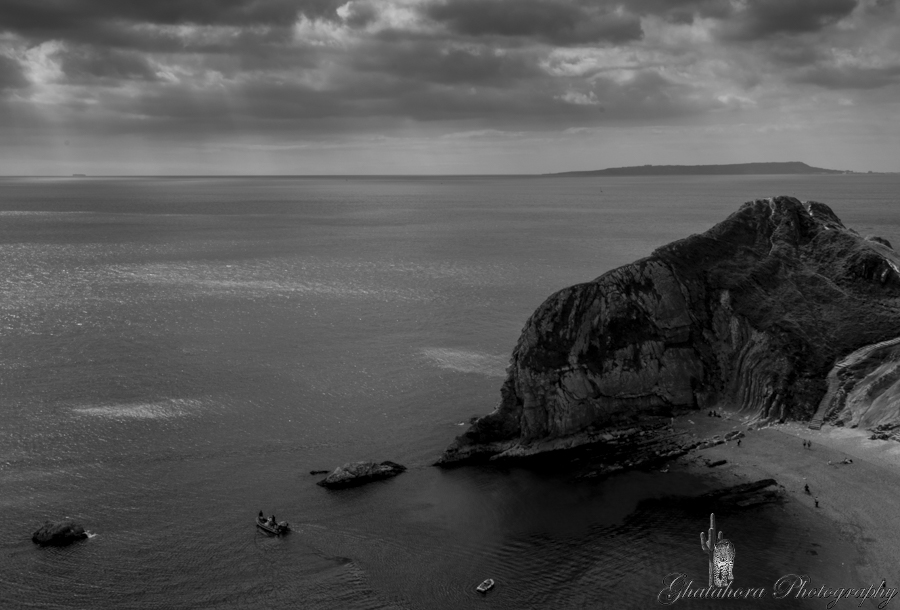
Here are some more landscape photographs in black/white. I love taking photographs of landscapes, espeacially in b/w to create dramatic, moody images.

Photo 1: Trees - Pamber Forest


Photo 2: Trees - Pamber Forest


Photo 3: Road to the mountains - Lake District


Photo 4: By the lake - Scotland


Photo 5: Snowy day - Pamber Forest


Bhupinder Ghatahora
Ghatahora Photography
https://twitter.com/Ghatahora